Backlog AI
AI-powered backlog creation and refinement experience.
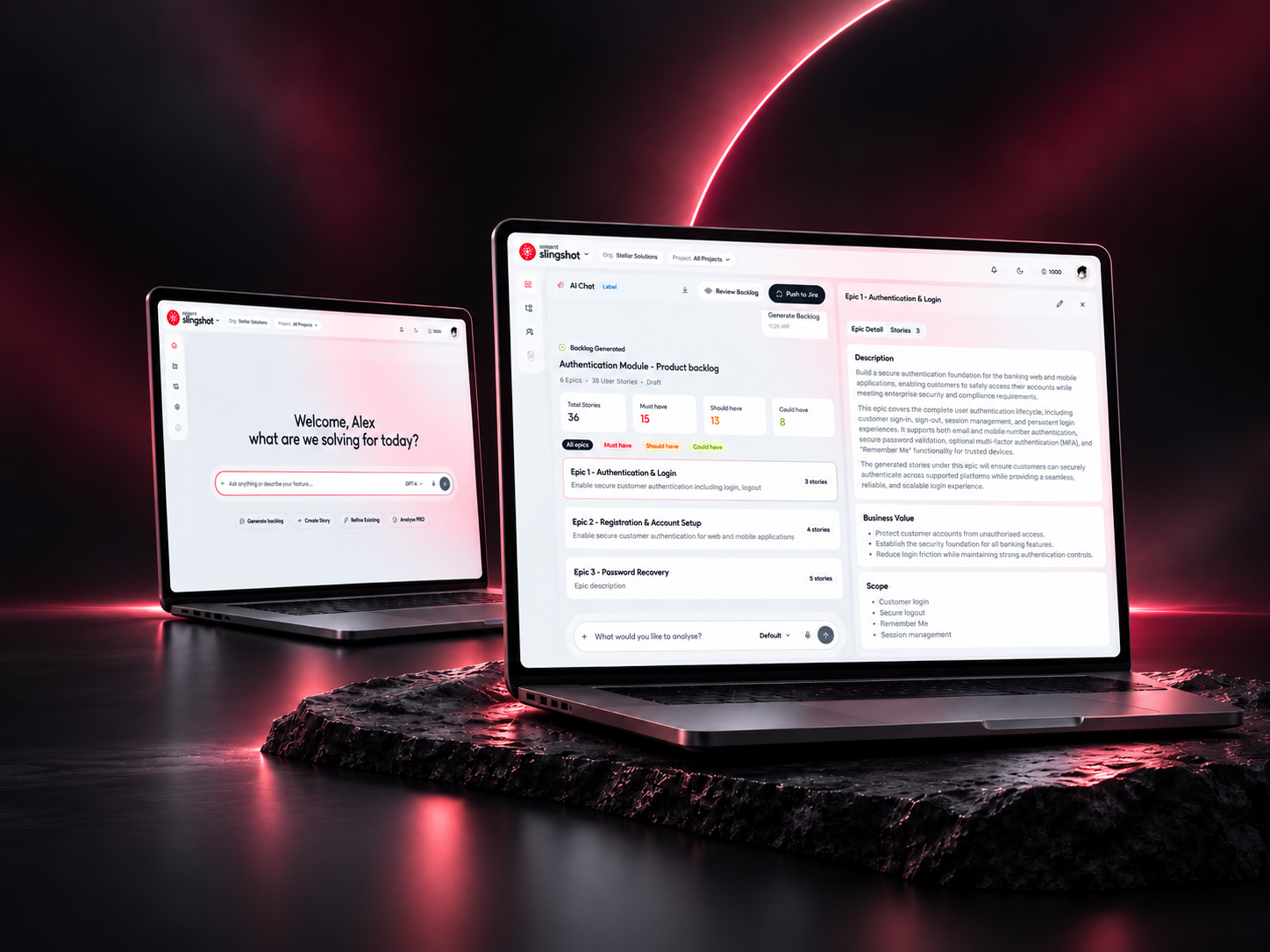
Understanding the Context
What was happening, who it affected, and why the project mattered.
Project Context
Backlog AI is part of a broader enterprise SDLC platform, built to help Product Managers turn plain-language product intent into structured, prioritized backlogs. As AI generation was layered onto an already dense workflow, the product needed to stay understandable and trustworthy even as it became more automated.
Existing Experience
Creating a backlog meant moving through several disconnected steps — uploading requirement documents, waiting for generation, then reviewing output across separate panels with little indication of what the AI had changed or why. Each step reset context, so users had to reconstruct their intent as they moved forward.
The Challenge
Multiple disconnected steps made it difficult for users to understand what the AI was generating, changing, or recommending.
User Problems
Users lacked visibility into AI-generated changes.
Complex backlog workflows required too many disconnected actions.
Users needed more control before applying AI recommendations.
Important issues were difficult to prioritize.
Supporting Visuals
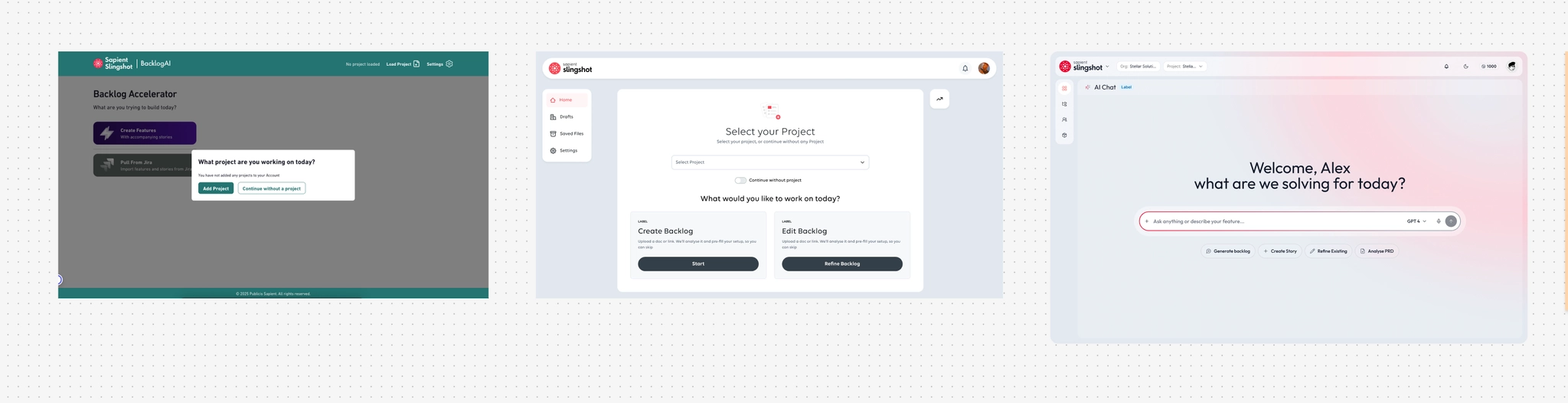
Old vs. new home screen
Defining What Needed to Change
What I was responsible for solving, and what success needed to look like.
Design Challenge
My Role
I led the end-to-end experience design for the redesign — from early workflow mapping through to final interaction patterns and design-system components. I worked closely with product management to define scope, with engineering to validate what was technically feasible for AI-generated content, and with research to test directions with real Product Owners.
Goals
Simplify backlog creation and refinement.
Make AI activity more transparent.
Give users control over AI-generated changes.
Constraints & Success Criteria
- Work within the existing product architecture and platform-wide design system
- Support enterprise-scale workflows, real delivery timelines, and inherent AI uncertainty
- Deliver a clearer, lower-effort workflow with better visibility into AI recommendations
- Make review and approval easier, with consistent behavior across every AI-assisted step
Designing the Experience
What I actually did — from mapping the existing workflow to shipping the final experience.
Understanding the Workflow
Before proposing anything new, I mapped the existing information architecture end to end — where users entered the flow, where they lost context, and where AI activity was invisible. Reworking that structure, not just the visual layer, turned out to be the core of the fix.
The Shipped Flow, Step by Step
Land in chat — Intent-first landing.
Describe the feature — Natural language, attach context.
AI confirms scope — Summarizes before generating.
Backlog generates inline — Epics, stories, criteria, priorities.
Refine in thread — Split-panel epic/story detail.
Selective push to Jira — Choose epics and stories to publish.
Confirmation — Published with Jira IDs.
Exploring the Experience
I explored several interaction models before settling on a direction — from a lighter-weight version of the existing wizard, to a fully conversational surface, to a hybrid that kept structured views but removed the step-by-step gating. Prototypes helped compare how each held up under real, messy inputs.
Key Design Decisions
From Workflow to Conversation
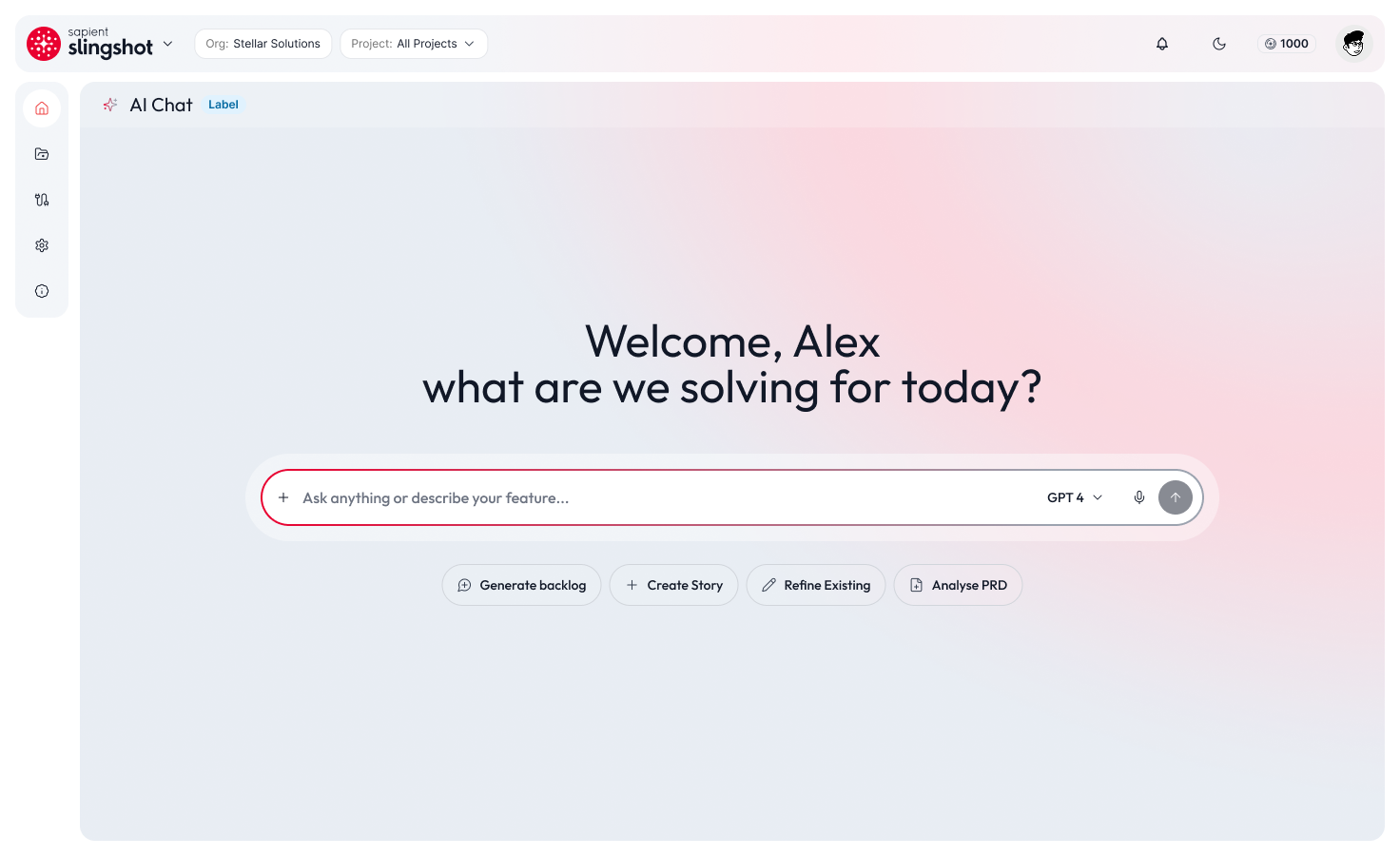
Surfacing AI Reasoning Inline
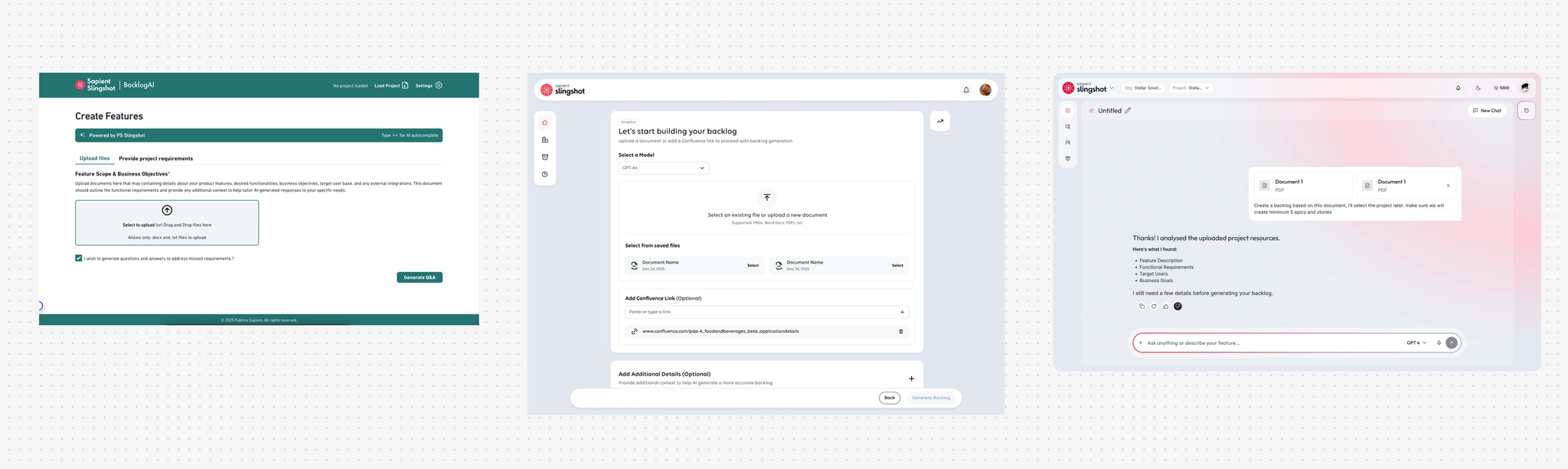
Review Before Apply
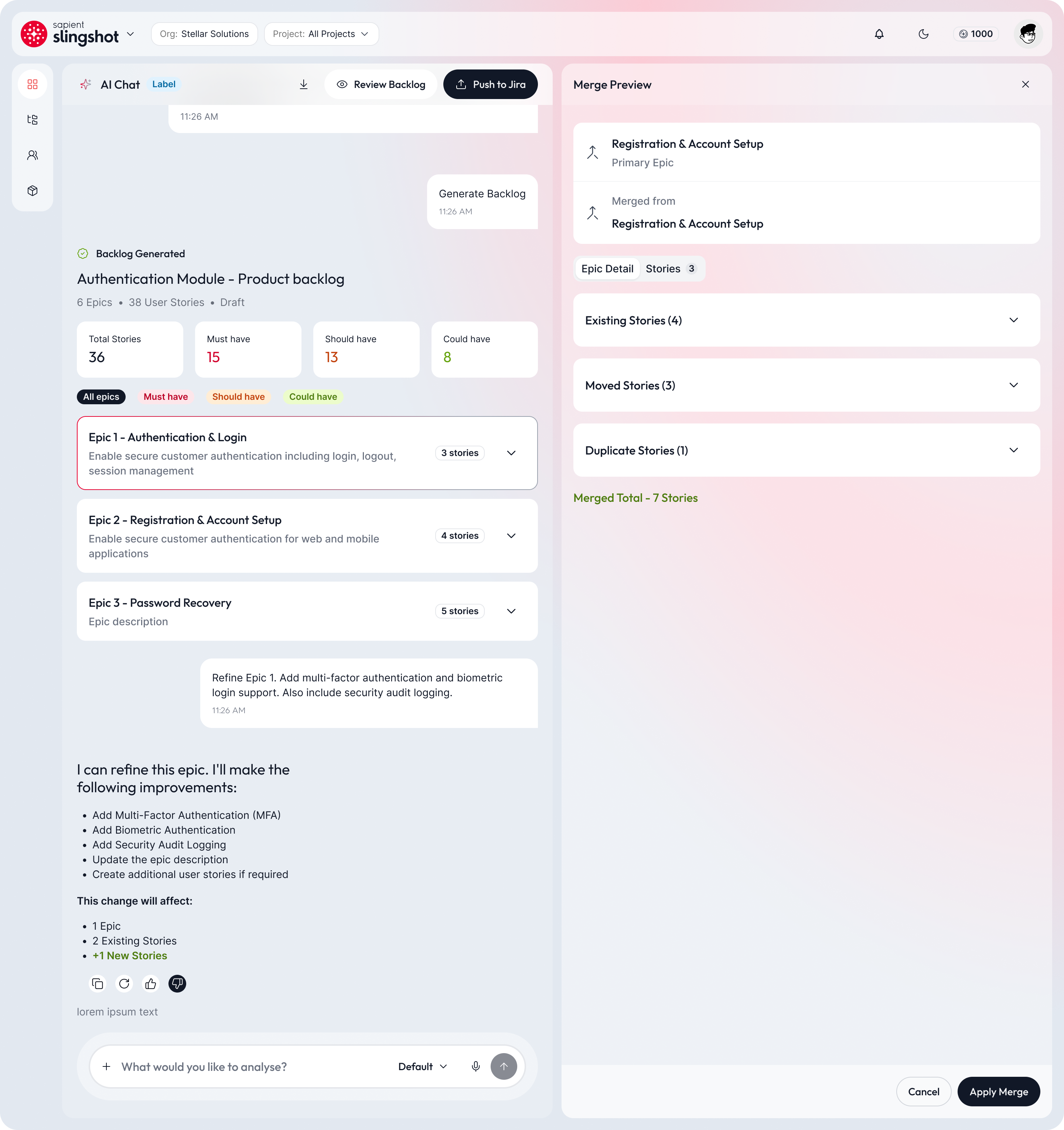
Showing What AI Is Doing
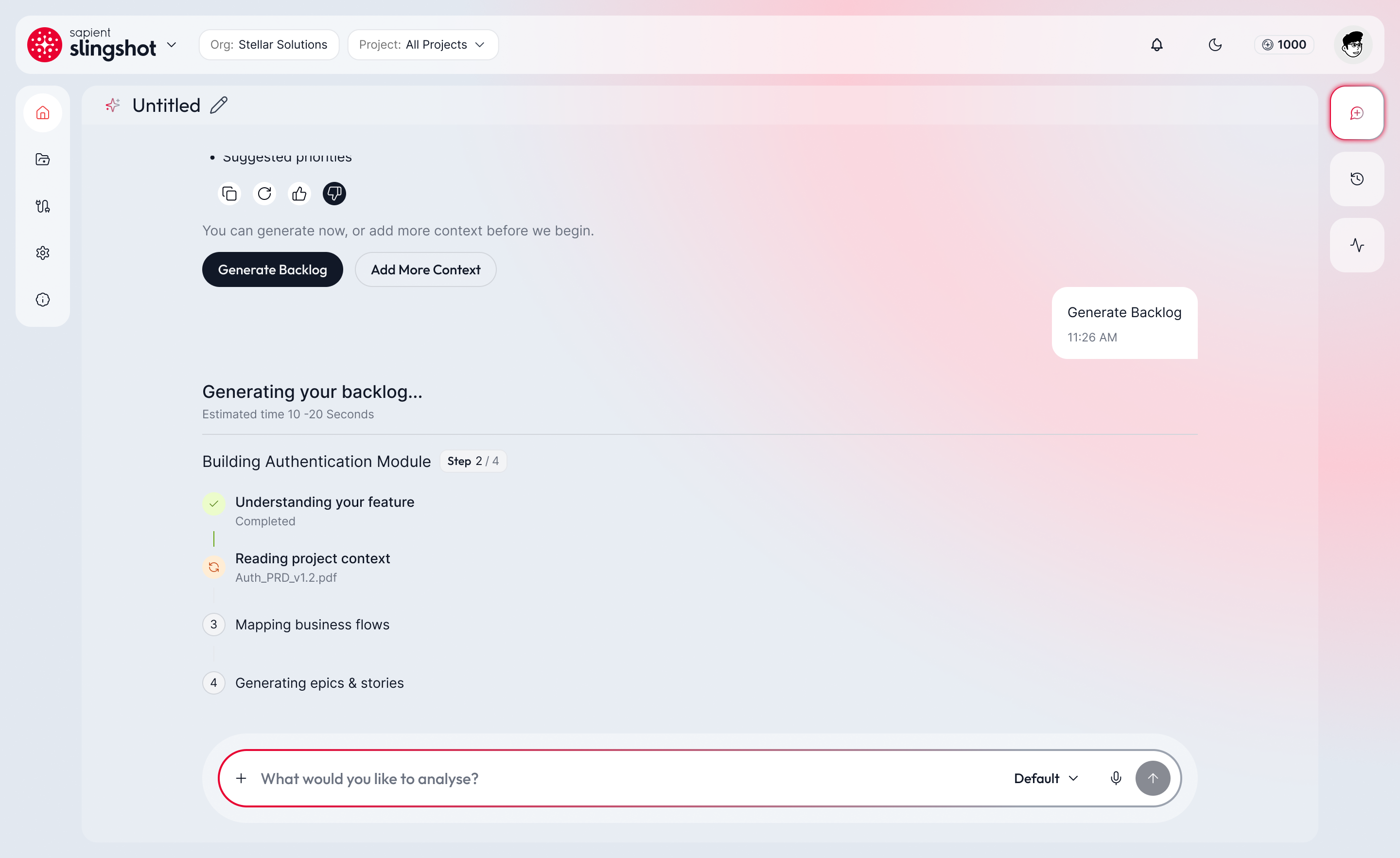
User Research Findings
“I clicked the Backlog AI CTA and thought it was stuck — nothing happened after I clicked.” — Product Owner, usability session
No loading state existed between the click and the result. We added visible system feedback at every step, so the system is never silently working.
“I'm not sure what the AI is doing — if I knew, I'd trust the tool more.” — Product Owner, usability session
Trust was breaking down because the AI's reasoning was invisible. We surfaced its intermediate steps directly in the conversation instead of treating generation as a black box.
Benchmarking: Old vs. Re-skin vs. New
Old
Traditional form-based tool — project gate, manual field entry, no AI framing.
Re-skin
Visually modernized but functionally identical — still required project selection before intent, still separated “Create” and “Edit” as distinct paths.
New (conversational-first)
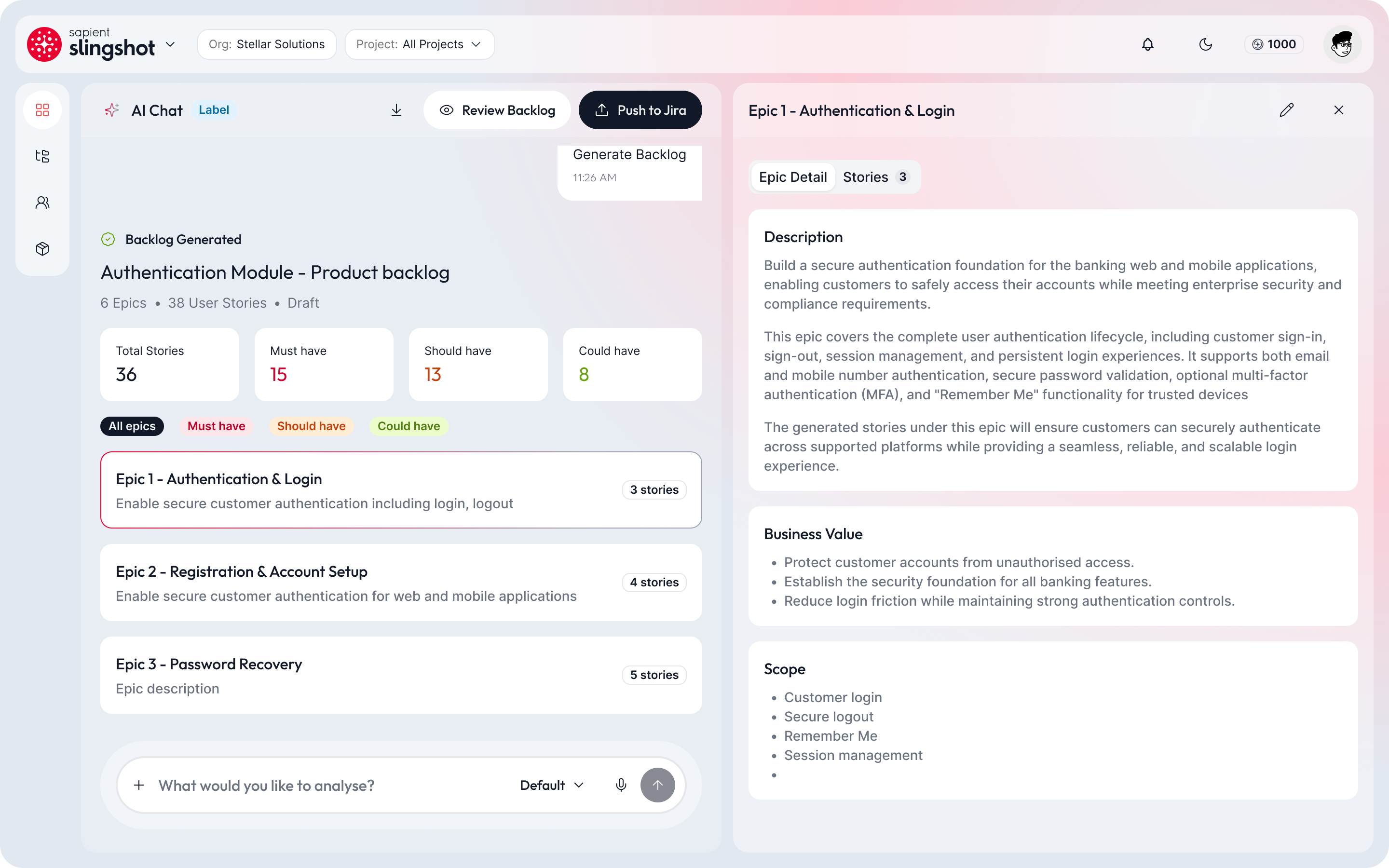
Intent-first landing, progressive context collection, AI reasoning surfaced inline, single workspace for chat, backlog, and refinement.
The re-skin comparison was a useful checkpoint — it proved that visual polish alone doesn't fix navigation or cognitive load; the underlying interaction model had to change.
The Final Experience
The shipped experience across the core stages of the workflow — from first describing intent through to a finished backlog.
Create Backlog
Users describe what they're building in plain language; the AI asks clarifying questions before generating a first pass.
Refine Backlog
Refinement happens in place — no separate edit mode, no re-uploading documents to adjust scope.
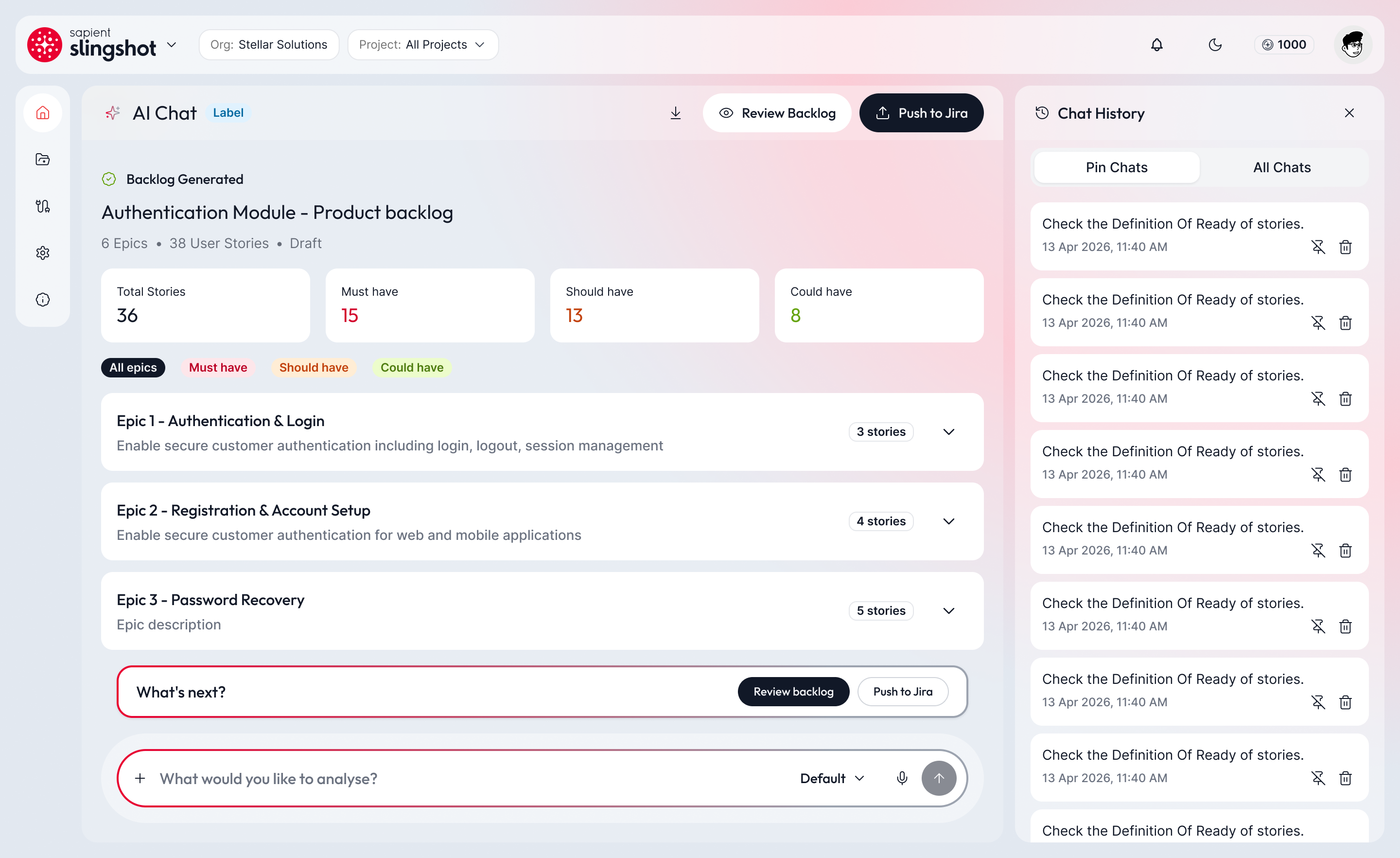
AI Recommendations
Recommendations surface inline with a rationale, priority signal, and a clear accept/adjust/dismiss action.
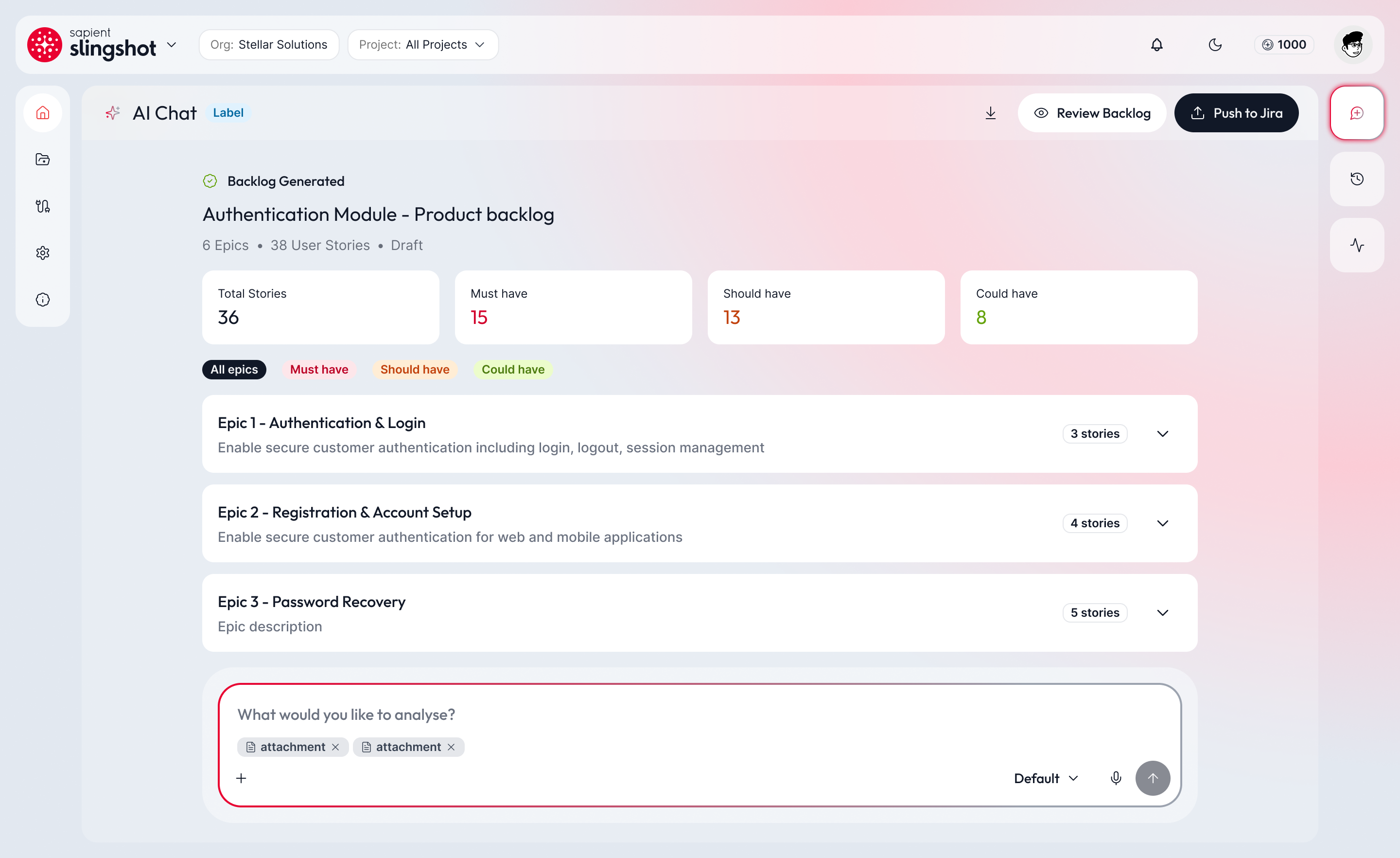
Review & Apply
A dedicated review step summarizes everything the AI is proposing before anything is written back to the backlog.
Working Within the Design System
Backlog AI shares a single design system with the rest of the platform. Most of the work meant extending existing components with AI-specific states rather than inventing a parallel visual language — new patterns were added only where none of the existing components could honestly represent what the AI was doing.
Bringing In Outside Context
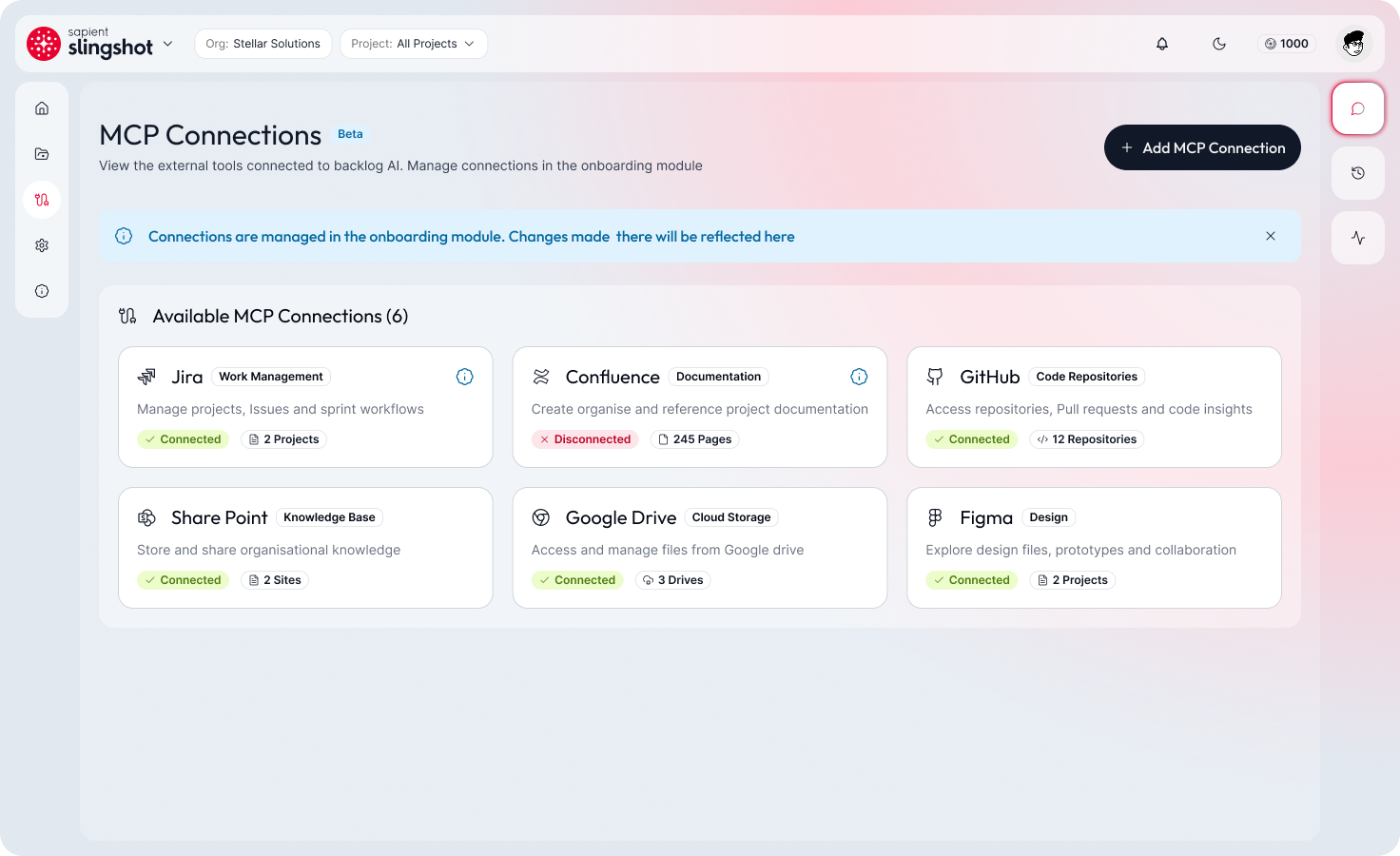
Beyond file uploads, the AI can connect to live data sources — Jira, Confluence, Google Workspace — so it grounds its questions and generated backlog in what already exists, not just what's typed into the chat.
What Changed
What shipped, and what it changed for the people using it.
Outcome
The redesigned experience established a clearer, more transparent workflow for creating and refining backlogs with AI while maintaining user control.
Impact
Improved Clarity
The workflow reads as one continuous thread instead of a series of disconnected steps, so intent isn't lost between screens.
Reduced Complexity
Fewer required actions to go from a plain-language description to a reviewable backlog.
AI Transparency
Every AI action now carries a visible rationale, so recommendations are easier to trust or correct.
Workflow Consistency
The same review-before-apply pattern now holds across every AI-assisted step in the product.
Metrics
Before / After
The workflow shift, summarized the same way the rest of the product experienced it.
What I Learned
Designing for AI means making uncertainty visible rather than smoothing it over — the moments I was tempted to hide were usually the ones users needed to see most.
Complex enterprise workflows respond well to progressive disclosure. Removing steps mattered less than removing the need to hold everything in your head at once.
AI should assist decision-making without removing user control — the best moments in this project were the ones where the system slowed down to ask, not just act.
- Situation
- An AI backlog tool that generated results without explaining them, inside a fragmented, multi-step workflow.
- Task
- Design an AI-assisted backlog workflow that stays understandable, controllable, and efficient.
- Action
- Rebuilt the workflow around a conversational surface with visible AI reasoning and an explicit review step.
- Result
- A clearer, more transparent backlog experience that keeps users in control of what AI applies.
“Backlog AI gave me back my evenings. I'm no longer staying late just to write Jira stories — I'm using that time to talk to customers and think about the product.” — Product Manager, internal user on Backlog AI